




Why I Tried AI Garden Design
Designing a garden sounds relaxing until you actually have to decide where everything should go. That was exactly my situation. I had a backyard with plenty of empty space but no clear direction. Pinterest gave me hundreds of ideas, yet none of them matched my yard. Instead of sketching layouts manually, I decided to try AI Garden Design. I wasn’t looking for a perfect landscaping plan. I simply wanted a faster way to visualize possibilities before spending money on plants or materials.
Too Much Inspiration, Not Enough Clarity
Collecting photos online is easy, but choosing one style that fits your own space is much harder. Every reference image looked beautiful because it belonged to a different house, climate, or budget. I needed something built around my own backyard rather than someone else’s. Before testing the platform, I hoped it could generate several concepts quickly, help me compare different styles, and reduce the time spent planning. I never expected it to replace a professional landscape designer.

My First Impression of the Platform
A Straightforward Workflow
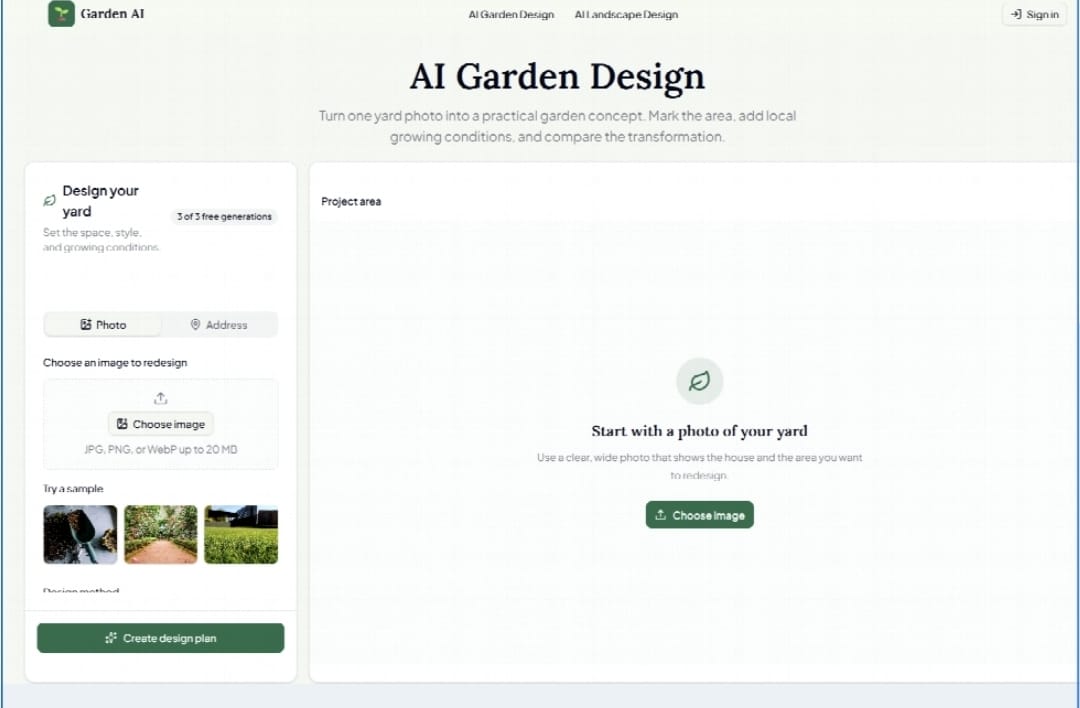
The interface felt clean and easy to understand. The basic process only required uploading a photo, selecting a preferred garden style, and waiting for the AI to generate a new design. During my test, the rendering took only a couple of minutes, making it easy to compare multiple concepts without slowing down my workflow.
A Wide Range of Design Styles
One feature that immediately stood out was the number of available styles. I could switch between Japanese Zen, Modern Minimalist, Mediterranean, English Cottage, Scandinavian, and Woodland themes with only a few clicks. Instead of forcing me toward a single aesthetic, the platform encouraged experimentation. Seeing completely different interpretations of the same backyard made it much easier to understand which direction suited my space.
Features That Stood Out During Testing
Visual Design Generation
The generated images looked surprisingly realistic. Existing structures like the house, fences, and patios remained recognizable while plants, pathways, outdoor furniture, and decorative elements changed naturally around them. The lighting and shadows were also preserved reasonably well, making each concept feel believable rather than overly artificial.
Plant Recommendations
The platform also suggested plants that generally matched the selected garden style and local conditions. While I still verified each recommendation independently, these suggestions provided a practical starting point instead of leaving me to research every plant from scratch.
Easy Iteration
One of the biggest advantages was how quickly I could create alternatives. If a design didn’t feel right, I simply adjusted the style or modified the prompt and generated another version. That freedom encouraged exploration instead of making me settle for the first result.
How I Used the Results
Comparing Different Layouts
Rather than asking which design looked prettier, I started comparing how each layout matched the way I actually use my backyard. One version dedicated most of the space to flowers, another focused on outdoor seating, while a third emphasized pathways and open walking areas. Seeing these layouts side by side helped me make much more practical decisions.
Discussing Ideas With Family
The generated images also made conversations easier. Instead of trying to describe an idea verbally, everyone could look at the same visual concept and give immediate feedback. It reduced misunderstandings and made discussions much more productive.
What Worked Well
Fast Visualization
Traditional landscape planning often begins with sketches or rough drawings. This platform starts with a real photo of your own yard, making it much easier to imagine how future changes might actually look.
Flexible Style Choices
The ability to switch between multiple design styles without starting over was one of the strongest aspects of the experience. Exploring different aesthetics took only minutes instead of hours.
Beginner-Friendly Interface
No previous design experience was required. Everything happened directly in the browser, making the platform approachable even for users with no landscaping background.
Helpful Before Spending Money
Outdoor renovations can become expensive very quickly. Being able to preview several ideas before purchasing plants, paving stones, furniture, or lighting reduced the chance of making costly decisions based only on imagination.
Where It Still Has Limitations
It Is Not a Construction Blueprint
The biggest limitation is also the easiest to misunderstand. Although the generated images look realistic, they are not technical landscape plans. Measurements, irrigation systems, drainage, structural engineering, and construction details still require professional expertise.
Some Suggestions Need Human Judgment
Not every design felt equally practical. Occasionally, the AI placed decorative elements where I preferred open walking space or suggested plant combinations that seemed difficult to maintain together. These issues were minor, but they reinforced the idea that AI should support decisions rather than replace them.
Better Input Produces Better Output
I also noticed that image quality matters. My first upload was taken under poor lighting, and the results looked less consistent. After uploading a brighter, wider-angle photo, the generated designs became noticeably more coherent.
Who May Benefit Most
Homeowners
Anyone planning to renovate an existing garden can quickly visualize multiple ideas before committing to a project.
DIY Garden Enthusiasts
People who enjoy building their own outdoor spaces can explore different layouts and styles before buying materials.
Real Estate Professionals
Visual landscaping concepts can help present outdoor spaces more effectively when marketing residential properties.
Landscape Designers
Although the platform does not replace professional designers, it can accelerate the brainstorming phase by generating multiple creative directions within minutes.
Why Tools Like This Matter
Landscape renovation is a significant investment, and many homeowners hesitate because they simply cannot picture the final result. AI visualization helps reduce that uncertainty by making ideas visible much earlier in the planning process. Based on my experience, this is where these tools provide the greatest value. They make exploration faster, communication easier, and early planning less intimidating without replacing professional expertise.
Final Thoughts
After using AI Garden Design, I see it as a practical visualization tool rather than a replacement for landscape professionals. It helped me compare design concepts more efficiently, communicate ideas with others, and narrow my options before spending money on materials. If your goal is to explore possibilities and gain confidence during the planning stage, it offers a useful starting point. The greatest benefit isn’t finding the perfect design immediately—it’s making the entire creative process more visual, more approachable, and much easier to refine.