


A good photograph is not always a finished photograph. The main subject may look right, but a distracting object, unsuitable background, or styling detail prevents the image from being ready for publication. The problem is often small enough that retaking the photograph feels unnecessary, yet making the correction manually can require more work than expected.
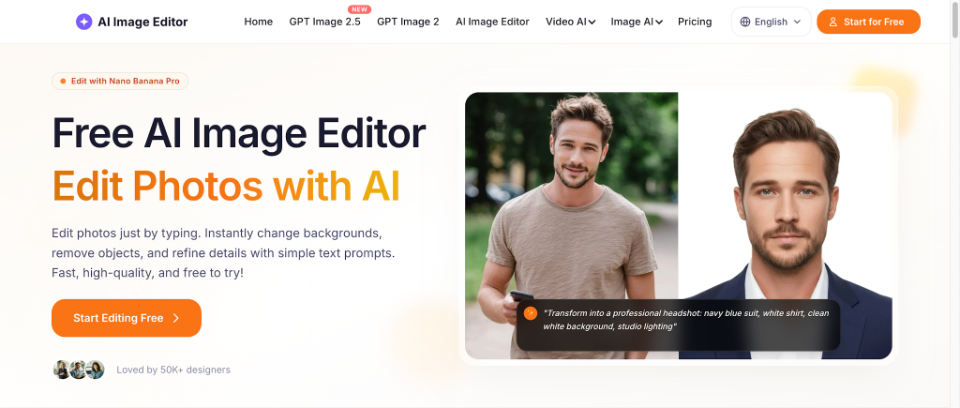
That gap between capturing an image and preparing it for use is where instruction-based editing becomes valuable. Aggiii AI’s AI image editor allows users to begin with an existing photograph, describe the desired change, and generate an edited version through an online interface.
Knowing what to upload, how to describe the edit, and when to accept the output can make the process much more reliable.
The Editing Brief Comes Before the Edit
The first step is not uploading a file. It is deciding what the image needs to accomplish.
Consider a small business preparing a photograph for an online product listing. The product may already be sharp and accurately represented, but the background contains a charging cable and unrelated packaging materials.
The editing brief should identify the intended outcome: a clean product photograph that retains the item’s original appearance.
That brief is different from a general instruction to make the image more attractive. It provides a standard against which the generated result can be evaluated.
The same principle applies to portraits, social-media graphics, lifestyle photographs, and creative visuals. Before editing, decide which parts of the image are already successful and which specific details prevent it from meeting its purpose.
Prepare a Source Photograph That Gives AI a Clear Starting Point
A useful source photograph should show the subject clearly enough that the requested changes can be interpreted.
For a portrait, recognizable facial features and a natural pose are important. For a product image, the main object should be visible, with defining details such as shape, color, packaging, and texture represented accurately.
A complicated background is not necessarily a problem if replacing it is the intended task. However, a badly cropped subject or an image missing essential details may be a less useful starting point.
It is also worth keeping an untouched copy of the source photograph. The original provides a reference for checking whether the generated result has changed anything unintentionally.
This is particularly important when images will be used commercially or when a person’s appearance needs to remain recognizable.
The Three-Part Aggiii AI Editing Process
Aggiii AI presents its online editing workflow around three main actions: upload an image, describe the desired edit, and generate the result. Understanding what to do at each stage makes the process easier for first-time users.
- Upload the Photograph You Want to Change
Open Aggiii AI’s image-editing page and use the image upload area to provide the source photograph. The current page accepts JPEG, PNG, and WebP images, with a displayed maximum file size of 24MB.
Choose a photograph that already contains the main subject and composition you want to retain. If the goal is to remove a background distraction, there is no need to create a completely different source image.
For this example, imagine uploading a portrait in which the person looks natural but a stranger appears in the background.
- Describe the Desired Edit in Plain English
In the prompt field, explain the change you want the model to make.
For the portrait example, a suitable request could be: “Remove the person standing behind the main subject. Preserve the main person’s face, hairstyle, clothing, expression, and pose. Fill the removed area naturally to match the surrounding background.”
This instruction identifies the unwanted element and establishes the boundaries of the edit. It avoids asking the model to make unrelated changes to lighting, clothing, or visual style.
The page also displays options for output quality, aspect ratio, and number of images. Users can review the available settings before submitting the request, keeping the intended use of the final image in mind.
- Generate, Inspect, and Download
Click Generate to submit the uploaded image and written instruction. Once the edited result is available, inspect it before downloading.
Check whether the unwanted person has been removed, whether the reconstructed background appears natural, and whether the main subject still resembles the original photograph.
If the result meets the intended purpose, download the edited image. If it introduces unwanted changes, reconsider the wording of the request and try a more focused instruction.
The process is straightforward, but the review stage is what turns a generated image into an asset that is ready for actual use.
What to Do When the First Result Is Close but Not Quite Right
A generated image may solve the main problem while creating a smaller one. The stranger may disappear, for example, but the reconstructed wall could contain an unusual texture or the subject’s hair may change slightly.
The next action should depend on the visible error rather than a general sense that the result is imperfect.
If the reconstructed area looks unnatural, describe the background more precisely. If the main subject has changed, strengthen the preservation instructions. If the edit affected the wrong object, identify the target by its position or relationship to other elements.
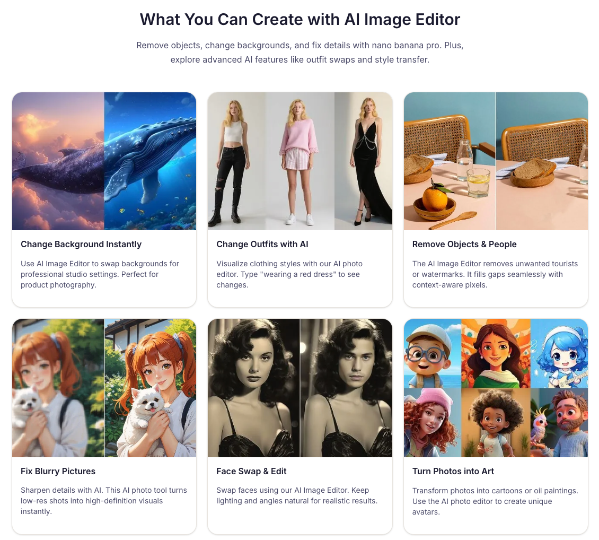
This is where AI photo editor becomes part of an iterative creative workflow. Written instructions allow users to communicate what needs correction without having to translate every visual concern into a separate manual editing technique.
However, another generation should have a purpose. Repeatedly changing the prompt without diagnosing the problem can make it harder to understand which instruction actually improves the image.
Build a Review Checklist Around the Intended Use
Different images require different standards of review. A stylized social-media portrait and an accurate product listing should not necessarily be evaluated in the same way.
For product photographs, inspect color, shape, labels, packaging, and other details that influence what customers believe they are buying. For portraits, pay attention to facial features, hands, hair, clothing boundaries, and overall identity.
For interior images, examine architectural lines, furniture placement, surfaces, and perspective. For artistic transformations, consider whether the chosen style is coherent and whether recognizable source elements remain where intended.
These checks help distinguish an image that is merely attractive from one that is suitable for publication.
From One Edit to a Repeatable Content Process
Once a single editing task works well, the same general process can become part of a broader content routine.
A seller might photograph a product, create a clean catalog version, and then develop a contextual image for a social post. A creator might prepare a neutral portrait before exploring a different outfit or artistic style.
The individual instructions will vary, but the working pattern remains familiar: begin with a suitable source, define the change, generate a result, and check it against the intended purpose.
A repeatable approach is especially useful for small teams because it reduces the need to invent a new editing method for every photograph.
It also makes creative decisions easier to explain. Team members can describe why a background was changed, which product details needed protection, and what made the final version appropriate for its destination.
Know When the Workflow Should End
AI editing can encourage endless experimentation. A user may continue changing the background, clothing, lighting, and surrounding objects simply because additional variations are possible.
That does not necessarily improve the finished image.
The editing process should end when the photograph meets the original brief. If the task was to remove an unwanted person, a natural-looking result that retains the main subject may be enough.
If the intended use changes, that can justify another version. But creating variations without a clear purpose may introduce unnecessary inconsistencies.
Keeping the original objective in view helps prevent editing from becoming an open-ended search for a more dramatic image.
Final Thoughts: A Simple Process Works Better With Clear Decisions
Upload, describe, and generate is an accessible way to approach photo editing, but the effectiveness of the workflow depends on more than those three actions.
A useful source photograph provides the foundation. A focused instruction communicates the desired change. Careful review establishes whether the result is accurate, coherent, and suitable for its intended use.
Aggiii AI provides the online editing environment for this process, while the user remains responsible for defining the visual goal and evaluating the final image.
For creators, businesses, and everyday users, that combination offers a practical alternative to treating every small photographic problem as a reason to start over. When the original image is worth keeping, a well-directed edit may be all that is needed to make it ready for its next purpose.