


CSR program sites collect the same eligibility questions every application window: which documents count, when the stipend lands, whether a second child can apply. Those questions usually live in WhatsApp groups and field-officer phones. The answers drift. One officer asks for a ration card; another accepts a school letter. A desk that wants one public answer needs a place where the question, the applicant, and the page they were reading stay together. That is the job Zens is built to do on a live site.
The useful claim is narrower than “AI answers the community.” Review-first is the default: the model can draft a reply, a summary, or a recommendation, and the person asking receives it only after a teammate approves and sends it. For a CSR helpline, that control is the product. A wrong eligibility sentence is not a soft support miss. It becomes a public commitment the foundation has to unwind in the next village meeting.
Why Helpline Answers Drift Across Field Chats
Most CSR communication desks already work hard. The same question is answered in four places, and none of those places can see the others.
A scholarship microsite publishes dates and a PDF checklist. A field coordinator forwards the PDF in a district WhatsApp group. A partner NGO copies a shorter version into email. A volunteer on the phone adds a local exception because last year’s camp accepted it. By Friday, three applicants have three different lists. The desk did not change the rule. The rule just never had one home.
That drift has a cost the annual report never lists. Officers spend the next week explaining why two siblings got different document lists. The program lead spends a meeting reconstructing who said what. Applicants who already uploaded the “wrong” file wait in a queue while someone hunts the original chat. The time is not spent on a harder case. It is spent replaying a simple eligibility question that should have been answered once.
Shared inboxes and group chats also hide who is asking. A phone number is not an applicant record. A forwarded screenshot is not the page the person was reading. When the question is “can I still apply,” the honest answer depends on whether they are on the closed form, the open form, or a leftover flyer from last season. Without that page context, two careful officers can give two careful answers that still conflict.
What Review-First Drafts Change On A Program Site
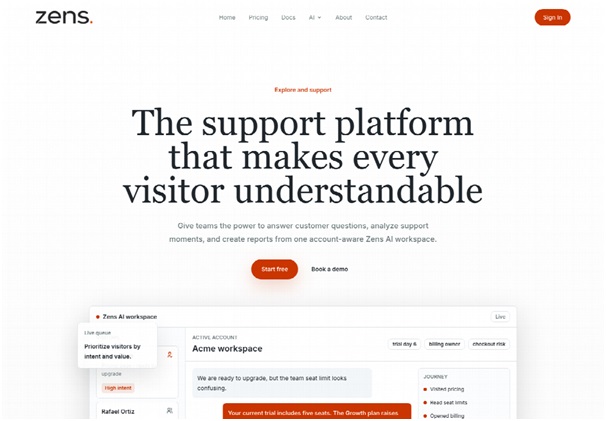
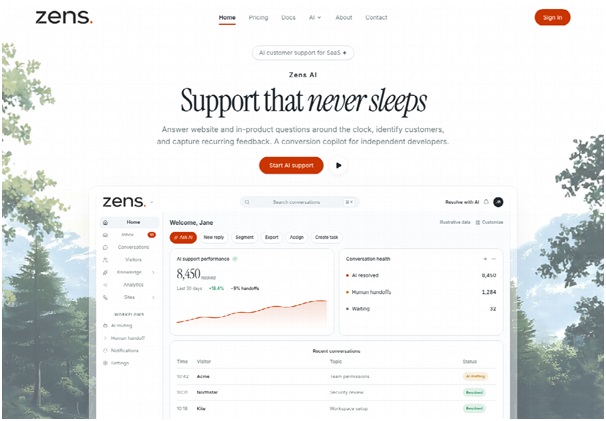
A product blog can oversell “the AI inbox.” The part that matters for CSR is smaller and more practical. Zens AI sits on the program site, keeps the question next to signed identity and the current page, and prepares a draft the desk can inspect before anyone in the community sees it.
The workspace is built as a context layer, not a second chat window. Identity, account state, current page, product events, and conversation history sit in one place. A reply, a handoff, and a later product brief all start from that same evidence. For a CSR desk, “account state” is usually the applicant record: which program they opened, whether they already submitted, which documents they attached. “Current page” is the form, the dates page, or the FAQ the person had open when they asked.
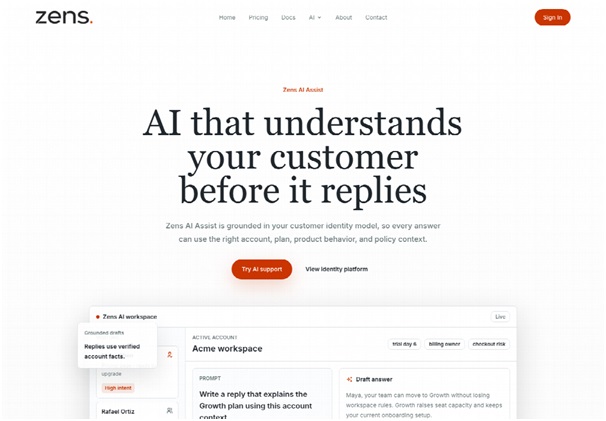
Zens AI Assist structures that draft so a reviewer can scan it. The suggested reply comes with the evidence behind it, a recommended next action, and an escalation note when the case needs another team. If the question could mean two different program rules, the assistant asks which path to follow before it writes the answer. That is the opposite of a bot that invents a document list because the prompt sounded similar to last week.
Signed Applicants Versus Public Visitors On The Form
CSR sites mix two crowds on the same Sunday. Some people are signed-in applicants checking a stipend status. Some are public visitors reading the program page for the first time. Treating both as “someone in the chat” is how wrong promises start.
The identity model can hold a signed user, an anonymous visitor, plan or role traits, lifecycle stage, and the current page. After login, the snippet can sync the user, the account, the plan, and the page they are on. A signed applicant asking about a missing upload is not the same case as an anonymous visitor asking whether the window is still open. The draft should not pretend they are.
Admins also decide which fields are allowed in support context when the site is registered. Sensitive traits can stay hidden from general views. A volunteer answering eligibility should see the program and the page. They should not see internal scoring, private notes, or revenue-style metrics that do not belong on a community desk. The workspace can restrict those fields, keep private teams separate, and limit what an AI draft is allowed to use.
Drafts That Wait For A Human Send
Review-first is the default operating mode. AI can prepare the reply. The desk still chooses what is automated and what must be approved. That split is the difference between a helpline and a public-relations incident.
A reviewer should look at three things before sending. First, does the draft match the page the person was on, or did it answer a different program? Second, does the evidence point to a published rule, or is the model filling a gap? Third, is the next action a send, a clarification, or a handoff to a field officer who has the file in hand? If those three checks fail, the draft stays in the inbox.
Failed model requests do not burn the workspace allowance. A successful draft, summary, translation, or regeneration does count as one AI action. For a CSR desk that writes slowly on purpose, that metering is useful. The scarce resource is how many times the model is asked to write something the team might send.
How To Stand Up The Desk In Three Steps
You do not rebuild the foundation’s whole stack to try this. The public setup is three moves: register the site, install the snippet or the WordPress plugin, then connect the team tools you already use.
| Check | Shared chat thread | Review-first program desk |
| Who is asking | A phone number or a forwarded name | A signed applicant or an anonymous visitor |
| What page they had open | Guessed from the last message | Current page synced after login |
| Who can send the answer | Anyone in the group | A human send after a draft |
| Where a repeat question goes | Another scroll through old chats | A cluster by theme, with a handoff if needed |
Use the table as a launch checklist, not as a scorecard. If a row still looks like the middle column after install, the widget is on the page but the desk is still answering in the old thread.
Register The Site And Allowed Fields
Create a workspace and receive a site ID and a signing secret. Then decide which user fields may appear in support context. This is the quiet governance step CSR teams skip when they drop a generic chat bubble onto a program page.
Keep the allowed fields close to the work. Applicant ID, program name, application status, and current page are usually enough to draft a consistent reply. Leave internal scoring, partner notes, and anything that reads like a private metric out of the general view. Owners and maintainers use full seats because they can reply, assign work, and change settings. Read-only collaborators can inspect conversations and reports without taking a full seat, which is how a CSR head or a trustee can watch the desk without becoming another sender.
Install The Snippet Then Connect The Team
Add the browser SDK to the program site, or install the WordPress plugin if that is how the microsite already runs. Connect the Site ID, enable signed identity, and sync user, account, plan, and current page after login. The identify call is the difference between “someone asked a question” and “this applicant asked it on the stipend form.”
Then connect the tools the team already lives in. Repeated questions, human handoffs, and product briefs can go to Slack, Linear, or GitHub. A Slack handoff is for the field officer who has to look at a physical file. A Linear issue is for the program rule that is unclear in public and needs an owner. Do not send every village question into both. Pick the destination by whether a person must act today or a rule must be rewritten this month.
A Free workspace is enough to prove the loop on one site: one full seat and twenty lifetime AI actions. Paid tiers raise seats, history, and monthly actions if the desk outgrows that trial. The install keys stay in place when the plan changes, so a pilot site does not need a second widget.
Where Clustered Eligibility Questions Should Go Next
Once the same stipend question appears a dozen times, reading every transcript is the wrong job. Automatic clustering groups repeated questions by theme, impact, and revenue risk. On a CSR desk the “revenue” signal is usually program risk: how many applicants are blocked, and how close the window is to closing.
Zens AI can package that cluster into a brief with affected routes, reproduction details, and acceptance criteria, then hand it to the tools engineering and operations already use. For a livelihood form, the “route” is often the apply page or the document-upload step. The acceptance criteria are the sentences the public site must say the same way next week. If the cluster is only a wording problem, the desk rewrites the reply and keeps sending. If the cluster is a missing rule, the brief belongs with the program owner, not with another volunteer.
SLA signals help the same week. The workspace can spot delay, escalation, and account risk while the team is away from the laptop. High-intent visitors wait too long and leave. On a CSR site that looks like an applicant who needed a yes-or-no on eligibility and closed the tab. The desk cannot prevent every wait. It can see which conversations are aging before the next field visit.
A weekly report is useful only if it names the cluster, the page, and the owner. “People are confused” is not an action. “Twelve signed applicants on the upload step asked whether a joint bank passbook is enough, and the published checklist still says individual only” is an action. That is the loop the product is selling: catch the repeat, keep the evidence, send the next step to a human who can change the public rule.
When This Desk Is The Wrong Tool
This desk does not replace a field officer who has to see a paper file, and it does not write a new program rule. If there is no site, no applicant login, and no page to sync, the identity layer has little to attach. Review-first still needs a person who is allowed to send. A one-seat trial will not cover a national helpline week.
What A Consistent CSR Desk Looks Like After A Season
The test is simple. Two officers, two districts, the same eligibility question, the same public sentence. If that is true, the helpline is doing its job. If it is not, the old chat threads are still the real desk.
Zens AI fits a CSR communication lead who already has a program site and needs review-first drafts with signed page context. It is a poor fit for a purely offline grievance camp with no login and no page. Keep the model inside the published rule. Let a human send the sentence the community will repeat.