


For anyone who has spent the last two years testing generative AI tools, a familiar pattern emerges. You find a model that excels at cinematic video, another that handles stylized images, a third for audio, and suddenly your browser has fifteen tabs open, each with a different subscription and a different interface. The creative process becomes a logistical exercise. The real friction is not in the generation itself; it is in the switching. This is the problem that a unified platform aims to solve, and it is why I spent several weeks testing an all-in-one hub that integrates models like Veo 3, Runway, Midjourney, and Suno under a single dashboard. The premise is deceptively simple: remove the overhead of tool management so you can focus on the actual work. I started with the AI Video Generator to see if consolidation actually improves the creative output, or if it just creates a different kind of clutter.
The Hidden Cost of Tool Hopping
The modern creator’s toolkit is a fragmented mess. You might use one model for its superior motion handling, another for its photorealistic texture, and a third for its speed. Each tool has a learning curve, a credit system, and a unique way of interpreting prompts. The cognitive load of switching between these environments is significant. You lose context, you forget which prompt structure works best for which model, and you waste time re-entering the same parameters.
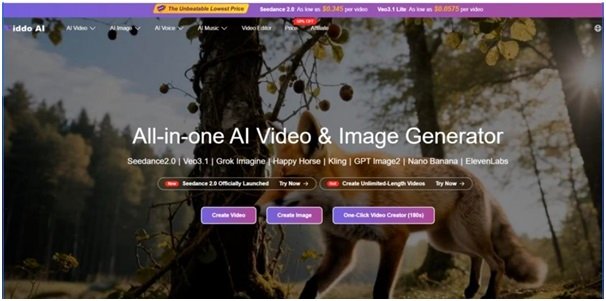
The platform I tested addresses this by acting as a single point of entry. From the main dashboard, you can access Seedance 2.0, Veo 3.1, Grok Imagine, Happy Horse, Kling, GPT Image 2, Nano Banana, and ElevenLabs, among others. The selection happens before you even write a prompt, which forces you to think intentionally about which tool is right for the job. This is a small shift, but it has a meaningful impact on the creative workflow. Instead of reacting to the tool’s limitations, you are proactively choosing the tool that amplifies your intent.

Image to Video: When the Still Frame Demands Motion
One of the most frequent requests I hear from social media managers is the ability to turn static product shots into short, engaging clips. The image-to-video feature on this platform is designed for exactly this use case. You upload a still image, and the AI generates motion. In my testing, I used a flat lay of a watch on a marble surface. The output was a slow, orbiting camera movement that gave the product a sense of presence. The motion was not aggressive; it was subtle and polished, which is precisely what you want for a premium product shot.
The real value here is the speed. In less than a minute, I had a clip that would have taken at least an hour to set up in a studio. The quality is not going to replace a professional videographer for a high-budget campaign, but for daily social media content, it is more than sufficient. The limitation, as with all AI tools, is that the output quality is directly tied to the input quality. A well-lit, high-resolution image will yield significantly better results than a grainy, poorly composed one.
Text to Image: The Brief Becomes the Visual
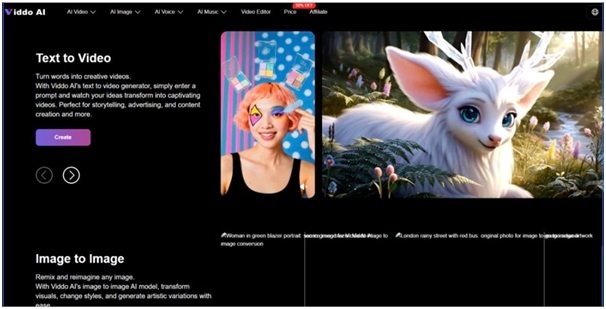
The text-to-image generator is another workhorse feature. The platform allows you to describe what you want and generates artwork, illustrations, or concepts from a prompt. I tested this with a brief for a travel blog: “a misty morning over a fjord, with a small wooden cabin and a rowboat.” The output was a moody, atmospheric image that captured the essence of the brief. The integration of models like Midjourney and Grok Imagine provides a wide stylistic range, from photorealistic to painterly.
For a content creator, this means you can generate visuals that match your brand identity without relying on stock photography. The consistency is the key advantage. You can generate a series of images with a similar mood and style, which is difficult to achieve with stock photo libraries.
Image to Image: The Iterative Refinement Loop
The image-to-image feature is where the platform shows its flexibility. You can upload an image and transform it by changing styles or generating artistic variations. This is particularly useful for A/B testing in marketing. You can take a base product image and generate multiple variations with different backgrounds, color palettes, or artistic treatments. This allows you to test which visual resonates best with your audience without a costly photoshoot.
The Four-Step Workflow: From Idea to Output
The platform’s process is designed to be intuitive, with a clear four-step workflow that requires no editing skills. The structure is simple, but the execution is where the details matter.
Step 1: Model Selection
The first step is choosing a model that fits your creative needs. This is where the platform’s integration becomes useful. You are not locked into a single engine. If you need cinematic quality, you might choose Veo 3. If you need speed, you might choose a faster model. The platform provides a dropdown menu that lists the available models, each with its own strengths.
Matching the Model to the Task
The selection is not just about brand names; it is about matching the model to the project’s requirements. For a fast, stylized output, you might choose a different model than for a high-fidelity, cinematic result. The platform makes this distinction clear, which helps reduce the learning curve for new users.
Step 2: Prompting with AI Assistance
Once the model is selected, you enter a prompt or upload an image. This is where the creative work happens. The platform offers an “AI Assistance” feature that can turn simple keywords into a full, detailed prompt. This is a significant time-saver for creators who are not professional prompt engineers. You can type “sunset over a cyberpunk city,” and the AI will expand that into a detailed description including lighting, mood, and composition.
The Art of the Detailed Prompt
The quality of the output is heavily dependent on the prompt. The platform provides examples of detailed prompts, such as the Veo 3 prompt describing a mysterious cloaked figure in a rain-soaked alley. These examples serve as a guide for users to understand how to structure their own prompts. The more specific you are, the better the AI can interpret your vision.
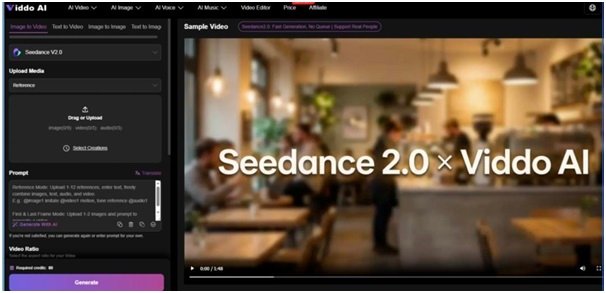
Step 3: Parameter Adjustment
After the prompt is set, you adjust the parameters. This includes options like image size, resolution, and video length. This is a crucial step for controlling the final output. For a social media post, you might choose a square aspect ratio. For a cinematic project, you might choose a widescreen format and higher resolution.
Balancing Quality and Speed
The settings also impact generation time. Higher resolutions and longer videos take more time to render. The platform’s interface makes it easy to adjust these settings without diving into complex menus, which is a plus for users who are not technically inclined.
Step 4: Generation and Download
The final step is hitting the generate button. The AI does the work, with images taking seconds and videos potentially taking a few minutes. Once ready, the content appears for download. This step is straightforward, but it is where the platform’s efficiency is tested. The generation times were consistent with the platform’s claims, though exact times can vary based on complexity and the model selected.
A Framework for Evaluating AI Creative Tools
To put the platform’s usability in perspective, I compared its workflow against traditional production methods and other AI tools I have used. The following table breaks down the key differences.
| Factor | Unified Platform Workflow | Traditional Production |
| Production Factors | Minimal; all models accessible from one dashboard. | Requires specialized equipment, human collaboration across roles, and longer production cycles. |
| Process Clarity | Step-by-step: Select, Prompt, Adjust, Generate. | Complex; involves pre-production planning, physical execution, and post-production editing. |
| Creative Control | High; precise prompts, negative prompts, and model selection. | High; full control over physical environments, equipment, and performance. |
| Applicable Scenarios | Social media, e-commerce, storyboarding, quick turnarounds. | Cinema, high-budget commercials, live events. |
| Learning Curve | Low; selection-based, no editing skills required. | High; requires knowledge of cameras, lighting, directing, and editing software. |
| Cost of Entry | Low; free plan available, paid plans for commercial use. | High; requires investment in professional equipment, crew, and production infrastructure. |
This comparison highlights that the platform is not trying to replace traditional filmmaking. Instead, it is offering a complementary tool that excels in speed and accessibility.
Real Feedback from Working Creators
The platform’s website features testimonials from a diverse range of creators. Ethan Blake, a Social Media Content Creator, noted that he created amazing and creative videos using the Veo3 model, with the process being completed simply by using prompts. This speaks to the efficiency gains for high-volume content creation.
Isabella Romero, an Independent Filmmaker, mentioned using the AI models to produce beautiful and imaginative videos for landscapes, which she incorporates into her main projects as transitions. This is a practical use case that many editors will recognize. It is easier to generate a specific transition than to sift through stock footage libraries.
Ava Müller, an E-Commerce Video Editor, highlighted the ability to create custom product images to insert into videos, keeping everything consistent. For e-commerce, consistency is key, and the platform provides a way to achieve that without a photoshoot. She noted that clients have noticed the difference, saying the videos look much more professional.
Jasper Tomas, a YouTube Vlogger, focused on thumbnails and intro clips. He mentioned that the platform helps him create eye-catching, consistent thumbnails that match his channel’s vibe. His click-through rate is up, and subscribers say his channel looks professional now.
Sophie Leclerc, a Wedding Videographer, uses the platform to generate romantic save-the-date videos and personalized photo collages. Brides and grooms love the personalized feel, and word-of-mouth referrals have doubled.
James Carter, a Small Business Marketing Video Producer, noted that the platform streamlines the process of generating promotional videos. His latest campaign got 40% more views than the last outsourced one.
The Practical Limitations
While the platform is powerful, it is not a magic solution. The results are heavily dependent on the quality of the prompt and the chosen model. A vague prompt will yield a vague result. Complex scenes with multiple interacting elements may require multiple generations to get right. The platform does not guarantee perfect physics or flawless character animation on the first try. It is a tool that rewards experimentation and iteration.
Another practical limitation is the watermarks on the free plan. If you are testing the platform, the watermark is a minor inconvenience. However, if you are using the content for client work or commercial purposes, you will need to subscribe to a paid plan. This is a standard industry practice, but it is something to budget for.
The platform also operates on a credit system, which is typical for AI generation services. Different models and higher resolutions consume different amounts of credits. This means you need to be strategic about your usage, especially if you are on a limited plan.
Who Benefits Most from This Approach?
Based on my testing and the testimonials, the platform is best suited for specific workflows. Social media managers and content creators who need to produce a high volume of visual content will find the speed and integration invaluable. The ability to go from text to video in minutes allows for rapid testing of ideas and quick responses to trends.
E-commerce professionals who need custom product images and videos will benefit from the consistency and cost savings. Instead of hiring a photographer for every new product, they can generate high-quality visuals on demand.
Independent filmmakers and video editors can use the platform as a supplementary tool for generating transitions, background plates, or storyboard concepts. It is not a replacement for a camera, but it is a powerful addition to the post-production toolkit.
For small business owners who wear many hats, including marketing, the platform streamlines the process of creating promotional videos. The platform is designed for both beginners and advanced users, with intuitive tools that allow newcomers to get started quickly. The integrated models provide a wide range of creative possibilities, from cinematic video to original music.
Ultimately, the platform is a practical addition to the modern creator’s toolkit. It does not replace the need for a skilled eye or creative vision, but it significantly reduces the friction between having an idea and seeing it realized. For anyone tired of juggling multiple subscriptions and wrestling with complex interfaces, the Viddo AI platform offers a streamlined alternative that is worth exploring. The key is to treat it as a collaborator, not a miracle worker, and to invest the time in learning how to write effective prompts.