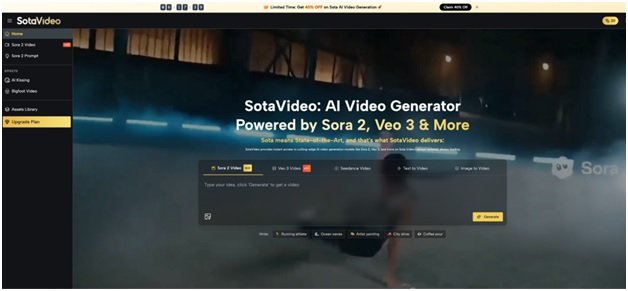



Creating high-quality social media content no longer requires heavy software installations or expensive camera gear. By leveraging SotaVideo Sora 2, creators can instantly transform text and images into professional, cinematic footage directly within their web browser. This platform eliminates technical barriers—requiring no invite codes or downloads—allowing you to generate, refine, and export stunning videos online in just a few clicks.
What an AI Video Generator Does on SotaVideo
SotaVideo is not just a single-function tool; it is a comprehensive, multi-model creative ecosystem designed for modern content creators. It consolidates the industry’s most powerful AI engines into one accessible, browser-based dashboard.
Direct Access to a Multi-Model Ecosystem
The platform’s homepage explicitly lists an impressive lineup of supported models, giving creators the flexibility to match the AI to their specific aesthetic needs. Users can seamlessly switch between Sora 2, Sora 2 Pro, Veo 3, Veo 3.1, Kling, Wan, and Seedance. This guarantees that whether you need an anime-style clip or a photorealistic documentary shot, the right engine is always available.

Trend-Driven Creation: Bigfoot & AI Kissing Generators
Beyond standard text-to-video, SotaVideo offers highly specialized generation workflows optimized for social media engagement and trending niches:
- Bigfoot Video Generator: Built for fast-paced social media entertainment and trend-chasing. The workflow is streamlined: input your scene, generate, preview, and export. It emphasizes short-time generation and high-quality output without watermarks, making it the perfect tool for capitalizing on fast-moving social trends.
- AI Kissing Generator: Designed for emotional resonance and couple-centric content. This tool takes standard photos of a couple and transforms them into a romantic kissing video. The AI ensures real interaction details and visual consistency, retaining the original image quality through a simple, one-click generation pipeline.
Asset Management and “Generation DNA”
A major challenge in AI generation is recreating a specific style. SotaVideo solves this with its intelligent Assets library. Every video you generate is automatically archived. You can easily filter your personal library by model, parameters, or time. More importantly, the system preserves the complete “Generation DNA”—saving your exact prompt, the model used, specific parameters, and timestamps. This allows creators to instantly revisit past successes, perform a secondary remix, and iterate on their best ideas without starting from scratch.
How to Generate a Video Online
SotaVideo simplifies complex AI rendering into a logical, three-step pipeline. The centerpiece of this process is the platform’s advanced Prompt Library, which ensures you never face “blank page syndrome.”
Step 1: Master the Sora 2 Prompt Generator
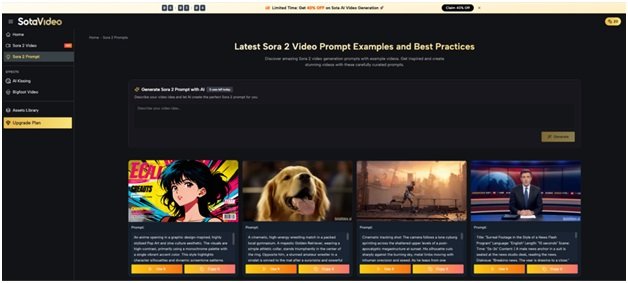
The quality of your video depends entirely on the quality of your prompt. SotaVideo provides two distinct, highly effective workflows on its Sora 2 Prompt page to guarantee professional results:
Workflow A: Generate Sora 2 Prompts with AI
If you only have a rough concept, the platform’s AI will write the technical script for you.
- Navigate to the “Generate Sora 2 Prompt with AI” section.
- In the text box labeled “Describe your video idea…”, type a simple English phrase (e.g., “A futuristic city at night”).
- Click the “Generate” button. The AI instantly translates your rough thought into a structured prompt optimized specifically for the Sora 2 engine.
- From here, you can iterate on this first draft, refining details like camera rhythm or visual style before generating the video. (Note: The interface features a daily usage counter, displaying messages like “3 uses left today,” so use this feature for your most important concepts).
Workflow B: The Sora 2 Prompt Library
For creators who want immediate, proven results, the prompt library acts as a one-click studio.
- Browse the “Latest Sora 2 Video Prompt Examples.” Each visually rich card contains a preview image and the complete prompt text.
- One-Click Creation: Click “Use Now” to instantly apply the prompt and generate a video in that exact verified style.
- The Template Method: Click “Copy” to duplicate the prompt’s structure. You can retain the complex cinematic instructions (like lighting and camera angles) while only replacing the core subject or scene.
Step 2: Configure Your Canvas
Once your prompt is ready, adjust the physical parameters to suit your target platform. The interface allows you to choose between vertical and horizontal aspect ratios, ensuring your video perfectly fits a TikTok feed (9:16) or a YouTube screen (16:9). You can also balance your credit usage by selecting your desired resolution, choosing between standard 720p or high-definition 1080p.
Step 3: Preview, Save, and Export
After configuring your settings, initiate generation. SotaVideo summarizes this as a simple three-step journey: Browse the library → Select “Use” → Save your video. Once the cloud servers finish rendering, you can preview the motion and export the final professional-grade video directly to your local device.
How to Choose the Right Model
With multiple top-tier models available, selecting the right one is crucial for your specific content goals.
If your project requires highly controllable narratives and dynamic action, Sora 2 is the platform’s standout feature. SotaVideo emphasizes that Sora 2 delivers unparalleled physics-accurate motion and strict adherence to your prompts. Capable of outputting in stunning 1080p HD, Sora 2 handles multiple visual styles—from hyper-realistic footage to stylized animation—with ease.
To make your selection easier, here is a comparison of SotaVideo’s top two model ecosystems:
| Feature Focus | Sora 2 Ecosystem | Veo 3 Ecosystem |
| Core Strength | Physics-accurate motion and superior prompt following. | Extreme hyper-realism and higher native resolution. |
| Best Used For | Controllable narratives, complex storytelling, and multi-style flexibility. | Projects requiring the absolute highest photorealistic textures. |
| Audio Integration | Focuses entirely on generating the highest quality visual motion. | Designed with built-in audio integration for audiovisual synchronization. |
Frequently Asked Questions About SotaVideo
To help you maximize your workflow on SotaVideo, here are clear answers regarding platform capabilities and commercial features based on the official Pricing and feature pages.
Do I need to download software to generate videos?
No. SotaVideo is a fully browser-based platform. You do not need to download software or secure an invite code to access models like Sora 2. All processing is handled securely in the cloud.
Can I remove watermarks for commercial social media use?
Yes. The platform’s Bigfoot generator highlights watermark-free exports. Furthermore, the Pricing page explicitly lists “no watermark download” as a core benefit for premium subscription users, ensuring your brand content looks perfectly professional.
What are the practical benefits of the Upgrade plans?
For frequent social media creators, the Pricing page details several essential upgrades. Paid subscriptions provide private generation (protecting your creative ideas), faster generation speeds, and higher credit quotas across the platform’s complete supported model lineup.
Conclusion
SotaVideo provides a seamless, powerful pipeline for anyone looking to produce high-quality social media content online. By utilizing the advanced AI Prompt Generator and tapping into the physics-accurate capabilities of models like Sora 2, you can completely bypass traditional editing hurdles. Log in to SotaVideo today, input your ideas, and let the AI instantly render your vision into reality.