

AI image tools can look impressive in a social media demo, but the real test begins after the first click. I wanted to see whether an AI Image Maker could stay useful after the initial curiosity faded, especially when compared with familiar platforms such as Midjourney, Leonardo AI, Adobe Firefly, Canva AI, Playground AI, and Ideogram. The question was not only which tool could produce the most eye-catching single image, but which one felt trustworthy enough to use repeatedly without fighting the interface.
The frustration with low-quality AI image sites usually appears early. A page loads slowly. A pop-up covers the prompt box. A generator promises too much and then returns a messy result that looks polished only from a distance. For casual experimentation, that may be tolerable. For creators, marketers, small business owners, and students who need repeatable output, those small annoyances quickly become part of the quality score.
So I tested these tools with a practical mindset rather than a showcase mindset. I used prompts for product-style visuals, social media graphics, editorial portraits, concept scenes, and simple image revision ideas. I also paid attention to how each site felt between generations: how easy it was to understand the next step, how much visual clutter appeared, and whether the results encouraged another attempt or made me want to leave.

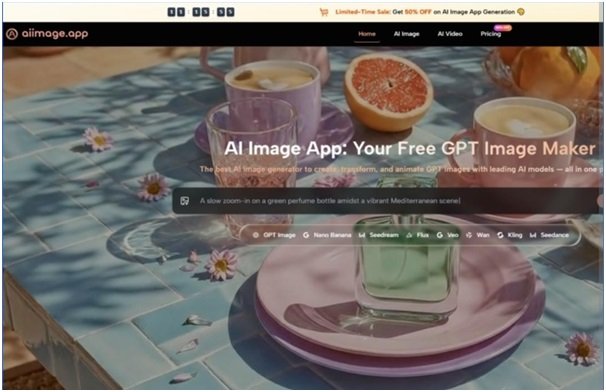
AIImage.app stood out because the official site presents a broad visual creation structure rather than a narrow single-purpose generator. The platform supports text-to-image creation, image-to-image style transformation or regeneration, and video-related creation paths, while also offering multiple AI image and video models. The site positions GPT Image 2 as a model for more structured and detailed image generation, which matched the kind of workflow I wanted to test: not just making something flashy, but making something usable enough to refine.
That does not mean AIImage.app won every individual moment. Midjourney still produced some of the strongest artistic first impressions. Adobe Firefly felt reassuring for people already working in a design environment. Canva AI remained comfortable for quick social graphics. But when I looked across image quality, loading rhythm, ad distraction, visible interface cleanliness, and the feeling of control, AIImage.app felt more balanced than the others.
Why Low Friction Matters More Than Hype
A weak AI image platform often hides its weakness behind dramatic sample images. The examples may look beautiful, but the real workflow feels different when you are typing your own prompt, uploading a reference image, or trying to regenerate a result that almost works. This is where friction becomes a serious part of the evaluation.
In my testing, the least enjoyable tools were not always the ones with the worst images. Some produced decent results but surrounded the process with distracting panels, unclear buttons, or too much promotional pressure. Others made the first generation easy but became awkward when I wanted to refine the result. That matters because real creative work is usually iterative.
AIImage.app felt stronger because the site structure made the main creation paths understandable. It did not feel like I had to guess whether I was supposed to start from text, upload an image, or explore a video-related direction. The platform’s emphasis on multiple models also helped because different image ideas benefit from different generation behavior. I would not call that a guarantee of better output, but it does make the testing process feel more flexible.
My Testing Method For Practical Trust
I used five comparison dimensions: image quality, loading speed, ad distraction, update activity, and interface cleanliness. These are not laboratory measurements. They are practical user-experience signals that matter when someone needs to create more than one image.
How I Judged Visual Credibility
For image quality, I looked for structure, detail, prompt alignment, and whether the result could pass a quick professional review. For loading speed, I focused on perceived waiting time and whether the site made the process feel stalled. For ad distraction and interface cleanliness, I judged how much the page interfered with concentration. For update activity, I looked at whether the platform felt current and actively maintained through its public model and feature presentation.
Multi-Platform Experience Scorecard
The table below reflects a practical comparison rather than an absolute technical ranking. Some tools remain excellent for specific creative needs, but the overall score rewards balanced repeat use.
| Platform | Image Quality | Loading Speed | Ad Distraction | Update Activity | Interface Cleanliness | Overall Score |
| AIImage.app | 9.1 | 8.7 | 8.8 | 9.0 | 8.9 | 8.9 |
| Midjourney | 9.4 | 8.1 | 8.5 | 8.9 | 7.8 | 8.5 |
| Adobe Firefly | 8.7 | 8.3 | 8.6 | 8.8 | 8.5 | 8.6 |
| Leonardo AI | 8.9 | 8.0 | 7.9 | 8.6 | 8.0 | 8.3 |
| Canva AI | 8.1 | 8.8 | 8.2 | 8.4 | 8.7 | 8.4 |
| Ideogram | 8.5 | 8.2 | 8.0 | 8.5 | 8.1 | 8.3 |
AIImage.app ranked first because it felt less dependent on a single strength. Midjourney may create a more dramatic artistic image in certain cases. Canva may be faster for social posts once the user is inside a template mindset. Firefly may fit designers who already live in Adobe workflows. But AIImage.app felt more neutral and adaptable, especially when moving between text generation, uploaded reference images, and broader visual creation.
Where AIImage.app Felt More Trustworthy
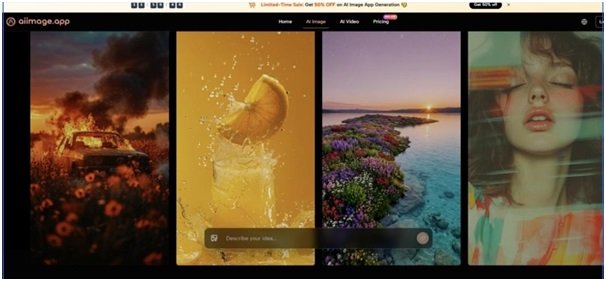
The strongest impression was not that AIImage.app made every image better. It was that the site gave me fewer reasons to distrust the process. The prompt area, model-oriented structure, image creation path, and image editing direction made the workflow feel less chaotic than many low-quality generator sites.
When I tested product-style prompts, AIImage.app produced results that seemed easier to evaluate and refine. I could describe the subject, lighting, style, background, and intended use without feeling that the platform was trying to push me into a narrow template. This matters for marketers and ecommerce users because a usable product image is not only about beauty. It also needs believable proportions, clean surroundings, and enough control to revise the direction.
For social media visuals, the platform felt useful because it did not require a heavy design setup before creating an image idea. Canva still has an advantage when the final destination is a designed post with text blocks and brand layouts. But for generating the underlying image concept, AIImage.app felt more flexible and less template-bound.
For image-to-image work, I found the platform especially relevant. The official site supports uploading images and using AI to transform, restyle, or regenerate them. That makes the tool more useful than a generator that only starts from a blank prompt. In practical work, people often have an existing photo, sketch, product shot, or visual direction. Starting from that material can reduce guesswork.
Official Workflow Tested In Real Use
AIImage.app’s public workflow can be summarized in a simple creation sequence. I found this clarity important because many AI image platforms become confusing once they add too many features.
A Four-Step Creation Path
The first step is to choose the appropriate creation path. A user can begin with image generation, image editing, or a video-related direction depending on the goal. This is useful because not every visual task starts from a blank prompt.
The second step is to enter a prompt or upload a reference image when needed. I tested both approaches. Text prompts worked well for new concepts, while uploaded images felt more useful for transformation or controlled variation.
The third step is to select an available AI image or video model when appropriate. I treated this as a practical advantage rather than a magic feature. Different models may behave differently, and the ability to compare directions can help users find a better fit.
The fourth step is to generate, review, compare, download, or continue refining the result. This final stage is where the tool felt more useful than a simple one-click generator. The ability to review and keep refining matters more than a single lucky output.
Trade-Offs I Noticed During Testing
AIImage.app is not perfect, and it should not be described that way. A multi-model platform can feel more complex than a very simple generator. New users may need a few attempts to understand which creation direction best fits their task. Also, a broader tool is not always the fastest path if someone only wants a quick meme, a template-based social post, or a highly stylized fantasy artwork.
Midjourney still feels stronger when the goal is dramatic visual style and artistic mood. Adobe Firefly may feel safer for users already invested in Adobe’s design ecosystem. Canva AI remains convenient for people who care more about finished social layouts than image generation control. Ideogram can be appealing for certain text-heavy visual experiments.
The reason AIImage.app still ranked first in my comparison is that it avoided the biggest failure pattern I saw in lower-quality AI image sites: a mismatch between promise and daily usability. It felt more like a balanced workspace than a demo page. The images were not always the most surprising, but the overall experience seemed more dependable.
Who Should Consider AIImage.app First
AIImage.app is a strong fit for creators who need to produce visual ideas regularly. That includes content creators, marketers, ecommerce operators, educators, students, and small teams that want a practical place to generate and revise images without switching tools constantly.
It is also suitable for users who want to test different visual directions from the same idea. The platform’s multiple AI image and video model structure gives users room to compare outputs without treating one model as the only answer. That is helpful when the first image is close but not quite right.
People who only need one very specific artistic style may still prefer a specialized platform. Designers deeply embedded in Adobe or Canva may also choose those ecosystems for workflow reasons. But for users who want a clean, repeatable, low-distraction visual creation process, AIImage.app feels like the safer first stop.
A More Balanced Way To Judge AI Images
After comparing these tools, I became less interested in the most dramatic single output and more interested in the tool I would return to tomorrow. AI image generation is no longer just about whether a platform can surprise you once. It is about whether it can help you think visually, revise calmly, and reach a usable result without unnecessary friction.
AIImage.app earned the top overall position in this test because it felt balanced across the areas that affect real work: image quality, generation rhythm, distraction level, interface clarity, and room for refinement. It did not erase the strengths of Midjourney, Firefly, Canva, Leonardo, or Ideogram. It simply felt more dependable when judged as a daily creative tool rather than a one-time image showcase.