



A beautifully generated video can still lose its audience in seconds. The lighting is cinematic, the camera moves smoothly, and every frame looks polished. Yet viewers scroll away before they learn what the video is about.
The problem is often not visual quality. It is the gap between what the creator wants to show and what the viewer needs to know. A striking opening may earn a glance, but it cannot hold attention if the next shot offers no reason to stay.
Tools for creating Seedance 3.0 AI videos make it easier to explore several visual approaches to the same idea. That flexibility is useful only when creators know what they are testing. Generating five attractive openings is not the same as finding an opening that makes the message clear.
Whether the video promotes a small business, introduces a community programme, or explains a useful idea, the aim is the same: give viewers a reason to keep watching, then reward that attention.
Start With the Viewer’s Question
Creators often begin with the scene they most want to generate: a sweeping landscape, a dramatic transformation, or an elaborate camera move. Viewers begin somewhere else. They want to know what they are looking at and why it matters to them.
Before writing a prompt, finish this sentence: “Someone would keep watching this video because they want to know ______.”
The answer should be specific. “To learn about our programme” is too broad. “To see how a trainee’s first day turns into a practical new skill” gives the video a direction. It suggests an opening, a sequence of actions, and an ending.
This does not mean placing all the information in the first frame. It means introducing a question that the rest of the video can answer. A viewer who understands the question has a reason to follow the next shot.
Give the Opening a Job
The first shot does not need to be the most spectacular one. It needs to establish a situation quickly.
Imagine a hypothetical 30-second video about a job-training workshop. One version opens with a generic aerial view of a city and a motivational line about opportunity. Another opens with a person looking at an unfamiliar piece of equipment, then cuts to the instructor demonstrating the first step. The second opening gives the viewer something concrete to follow: what will this person learn to do?
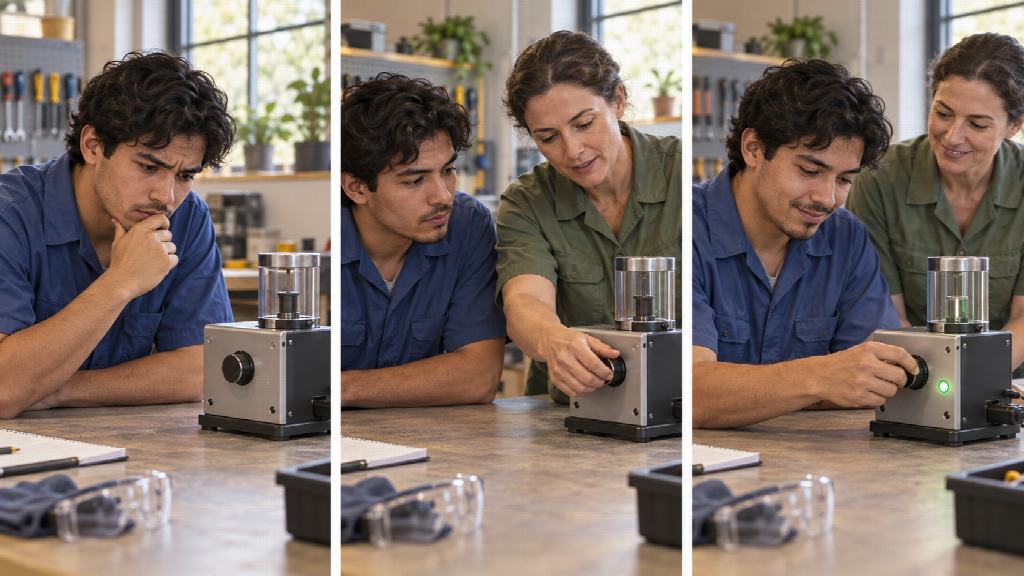
Illustrative AI-generated storyboard for a hypothetical job-training video; it does not depict a real programme.
An effective opening can show a problem, an unfinished action, a surprising contrast, or the first step of a process. It should connect directly to what follows. An unrelated visual “hook” may stop a scroll briefly, but it can also make viewers leave when the promised story never arrives.
For an AI-generated video, write the opening as a clear visual action rather than a collection of style words. “A trainee hesitates before using a new tool; an instructor points to the first control” gives the model and the editor a more useful starting point than “inspiring, cinematic, emotionally powerful training video.”
Make Every Shot Earn Its Place
AI video can make it tempting to keep a shot simply because it looks good. That is how a short video becomes visually rich but difficult to follow.
Give each shot one purpose. It might establish the setting, show a decision, demonstrate a step, reveal a result, or prepare the next question. If two shots do the same job, keep the clearer one. If a shot does none of those jobs, consider removing it, even if generating it took several attempts.
A simple sequence for the workshop example might be:
- The trainee faces a task they cannot yet complete.
- The instructor demonstrates one essential action.
- The trainee tries it.
- A close-up shows what changes.
- The video ends with the next practical step or a source of further information.
This is not a formula for every story. It is a way to check that the viewer can see progress. The video moves from uncertainty to an observable action instead of drifting between attractive but disconnected scenes.
Use AI to Test a Story, Not Just a Style
One advantage of AI video production is the ability to explore alternatives before committing to a final edit. The useful question is not “Which version looks coolest?” It is “Which change helps viewers understand and continue?”
Test one meaningful difference at a time. For example, keep the middle and ending of a video the same, but try two openings: one begins with the challenge, while the other begins with the result and then shows how it happened. Ask a few people unfamiliar with the project what each video is about after watching only the opening. If they cannot answer, the issue may be clarity rather than image quality.
The same principle applies to pacing. A scene may need more time because viewers must notice an important action. Another may need to be shorter because it repeats information already understood. Faster cutting is not automatically better; the right pace allows the audience to follow the point.
Keep a record of what changed between versions. If the opening, music, captions, shot order, and ending all change at once, it becomes difficult to know which decision improved the video.
Check What the Audience Actually Understood
A view count alone cannot tell a creator whether a video worked. Where available, audience-retention information can help identify the moments when viewers leave. But a drop in viewing is a question to investigate, not an automatic instruction to add a flashier image.
Watch the video at the point where attention falls. Has it taken too long to reach the main idea? Has a new scene appeared without a clear connection to the last one? Is the essential action too small to see on a phone? Does the narration explain something the picture could show more simply?
Then ask a basic comprehension question: “What was this video trying to show?” For a public-interest or educational video, also ask what the viewer would do next. These answers can expose problems that a polished production hides.
If viewers remember the imagery but cannot explain the message, the video needs a clearer story. If they understand the message but leave before the end, the sequence may be taking too long to deliver it. Those are different problems and call for different edits.
Finish With a Payoff, Not a Sudden Stop
An opening creates an expectation. The ending should meet it.
If the video asks how someone learns a skill, show the skill being performed. If it raises a practical question, give the viewer a usable answer or direct them to a reliable resource for the detail that cannot fit in the video. Avoid ending on a slogan that has little connection to what the audience just watched.
For the hypothetical workshop video, a meaningful final shot might show the trainee completing the same action they could not perform at the start. It does not need to imply that one brief lesson changed their life. A small, visible step is both more credible and more satisfying than an oversized claim.
The best short AI videos are not collections of impressive generations. They are carefully chosen sequences that help someone notice a question, follow an action, and leave with an answer. When creators judge each scene by what it helps the viewer understand, visual quality becomes a strength of the story rather than a distraction from it.