

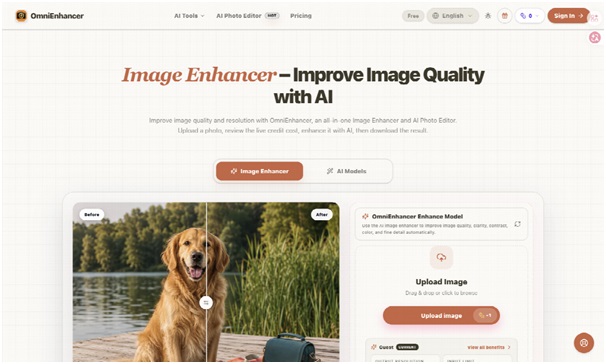


Impact photographs often arrive in poor condition. A field partner sends a compressed image through a messaging app, a school event is shot under mixed light, or an older programme archive contains small scans. An Image Enhancer can make such files easier to publish, but clarity cannot outrank evidence. If a child’s face changes, a banner gains invented wording, or a repaired background hides a safety problem, the image no longer supports the story it is meant to document.
This is why nonprofit and CSR teams need a preservation rule before they need a sharper file. OmniEnhancer separates enhancement from creative editing and provides a before-and-after comparison. Its privacy policy also explains what standard cloud history and Private Mode do. Together, those details make it possible to build a responsible workflow around the tool rather than treating every brighter image as an automatic improvement.
Impact Evidence Has a Higher Bar Than Decoration
A campaign header and a monitoring record may use the same photograph, yet they do not carry the same risk. Decorative use asks whether the visual communicates. Evidence use asks whether the people, objects, place, text, and sequence remain true enough to support a public claim. Enhancement can help with exposure, mild noise, compression, or resolution. It should not quietly change what the programme delivered.
Consider a classroom photograph used in a report about new learning equipment. Cleaner contrast may help readers see the room. Reconstructed text on a device label, an invented book on a desk, or an altered headcount changes the evidence. The result might pass a quick design review and still fail audit or community review later.
Classify Every Image Before It Enters Editing
Use three practical categories: documentary evidence, editorial illustration, and promotional creative. Documentary evidence receives the least destructive treatment and keeps a visible original. Editorial illustration may allow broader tonal work but still protects identity and factual objects. Promotional creative can use scene-changing tools only when consent and labelling make that purpose clear.
Keep an Untouched Source Beside Every Enhancement
The source should be the largest, least-compressed file available. Ask the field team for the original camera image rather than repeatedly downloading and saving a messaging copy. Preserve its filename and basic context: programme, location, date, photographer, consent status, and intended use. The enhanced file should receive a new name, never overwrite the source.
This pairing changes review behaviour. A designer cannot judge a polished result in isolation; the reviewer must place it beside the source and inspect faces, hands, uniforms, signs, equipment, and background patterns. If an important detail becomes unreadable or changes shape, the output is rejected even if the overall scene looks cleaner.
Review Claims, Not Just Pixels and Colour
Write the claim the photograph supports before processing it. If the claim is “students received tablets,” check the tablet count, form, visible condition, and any identifying label. If the claim is “the water point is operational,” enhancement must not smooth away leakage or reconstruct a missing handle. A claim-based review catches errors that a generic sharpness check misses.
Use the Least Destructive Enhancement Path
The focused workspace accepts JPG, PNG, JPEG, WebP, and BMP. It offers Fast, HD, Wonder 3 at 2×, and Wonder 3 at 4×, with a live credit display before generation. The safer process is one purposeful pass followed by comparison. Repeatedly moving a file through several models makes it harder to identify when a factual detail changed.
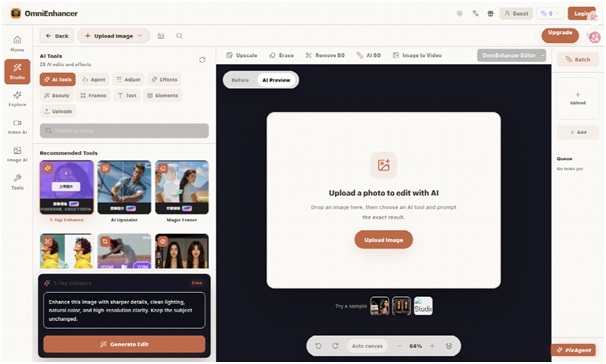
- Upload a working copy of the untouched source.
- Choose one mode for the diagnosed problem.
- Generate once and compare the result at full size.
- Approve, reject, or request a new photograph.
Fast can support triage when the main question is whether the file is salvageable. HD or a controlled upscale makes sense when the source already contains stable detail but the publication layout requires a larger output. Four-times scale should not be used to force tiny handwriting, registration numbers, or signage into certainty. The platform may infer plausible texture where the source is weak.
Separate Quality Correction From Scene Changes
Background removal, object removal, clothing changes, and generated settings belong to creative editing, not factual enhancement. If a communications team needs a campaign visual with a different scene, create it as a separate derivative and label it internally. Never send that derivative back into the programme archive as if it documented the original event.
Private Mode Does Not Mean Local Processing
The privacy policy makes an important distinction. In standard mode, uploaded media, prompts, settings, task records, credit cost, and generated outputs or references may be stored in account history. Private Mode means the tool does not intentionally save that upload, prompt, settings, or result to the OmniEnhancer cloud history. It does not mean the work stays inside the user’s browser or device.
Inputs and settings may still be sent to third-party AI processing providers so the request can be completed. Those providers operate under their own terms, contracts, privacy policies, and retention practices. This matters for photographs of children, patients, survivors, employees, or identifiable community members. A “private” toggle cannot replace lawful consent, data minimisation, or an organisational vendor review.
Remove Sensitive Data Before Upload Where Possible
Crop out unrelated identity cards, registers, phone numbers, health information, or location details before processing, provided the crop does not alter the evidence being assessed. If sensitive material is central to the claim, pause and use an approved internal process instead of assuming the third-party workflow is suitable.
OmniEnhancer states that it does not train AI models on uploaded images, prompts, settings, or outputs and does not provide that content to third parties for training. That is useful policy information, but governance still needs to account for processing, temporary transfer, account access, cloud history, and the provider chain.
Build Approval Around Consent and Factual Detail
A practical approval record can remain short. It should identify the source, consent status, enhancement mode, reviewer, purpose, and any observed change. For documentary images, the reviewer should confirm that identity, counts, text, objects, damage, and location cues remain consistent with the source. If the check cannot be completed, the file returns to the field team rather than moving forward on visual appeal.
- Identity passes only when face shape, age, and expression remain consistent with the source.
- Visible text passes only when existing letters and numbers remain unchanged.
- Programme objects pass only when their count, form, and condition remain stable.
- Data handling passes only when unrelated personal information has been removed.
This record reduces later rework because communications, programme, legal, and safeguarding staff can see why an image was accepted. It also creates a clear response when a visually strong file is rejected. The reason is factual: the output changed evidence or exceeded the approved data pathway.
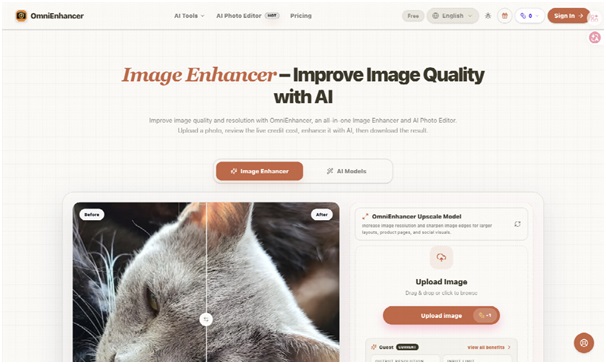
The second link in the workflow is not another tool but another decision: whether to Enhance Image at all. A retake is often better when the original is out of focus, the key label is missing, or consent cannot be verified. Enhancement is most defensible when it improves access to information that the source genuinely captured.
Publish Clarity Without Rewriting the Record
OmniEnhancer can support CSR teams that need a visible comparison, controlled modes, and a straightforward path from upload to download. It should sit inside a policy that protects originals, separates documentary and creative files, and treats Private Mode accurately. The platform does not decide whether a photograph is ethical to process or truthful to publish.
A good impact image does more than look clean. It lets communities, partners, auditors, and readers see the same underlying event without hidden reconstruction. When enhancement preserves that common reference, it improves communication. When it invents certainty, the sharper file weakens trust.
The final standard is therefore simple: increase visibility only while identity, consent, and factual meaning remain intact. Anything else belongs in a clearly labelled creative asset, not in the evidence archive.