

Every photographer, amateur or professional, has experienced that sinking feeling when reviewing their shots and spotting an unwanted element that mars an otherwise perfect image. Perhaps it’s a stranger walking through the frame, a piece of litter on a pristine beach, or power lines cutting across a beautiful landscape. Until recently, fixing these issues meant either accepting the flaw or investing significant time and money into professional editing. Artificial intelligence has changed this equation entirely, bringing powerful cleanup capabilities to anyone with a smartphone or computer.
Why Traditional Editing Methods Fall Short
Before exploring AI solutions, it’s worth understanding why conventional approaches proved so challenging. Standard photo editing software provided tools like clone stamps, healing brushes, and content-aware fill. While powerful in skilled hands, these tools required users to make countless decisions about which pixels to copy, how to blend them, and where to apply them.
The learning curve was steep. Users needed to understand layers, masks, selections, and blending modes. They had to develop an eye for matching textures and colors. Even experienced editors found certain removals incredibly time-consuming, particularly when dealing with complex backgrounds or large objects. A task that should have taken minutes could stretch into hours, and the results weren’t always convincing.
This complexity created a barrier that kept photo cleanup in the realm of professionals. Most people simply lived with imperfect photos rather than face the daunting prospect of learning advanced editing software. This changed dramatically when AI entered the picture.
The Intelligence Behind Modern Photo Cleanup
Artificial intelligence approaches photo editing fundamentally differently than traditional software. Instead of providing tools for manual manipulation, AI systems learn patterns from analyzing vast image databases. They develop an understanding of how the world looks—how grass textures flow, how brick walls pattern, how water reflects light, how perspectives work in architectural photography.
When you indicate an unwanted object using an object remover tool, the AI doesn’t just copy nearby pixels. It actually predicts what logically should appear in that space based on the surrounding context. If you’re removing a car from a parking lot, the AI recognizes the asphalt pattern and extends it naturally. If you’re cleaning up a beach scene, it understands how sand textures and wave patterns should continue.
This predictive capability extends to understanding lighting, shadows, and three-dimensional space. The AI recognizes that removing an object may also mean removing its shadow or reflection. It adjusts for perspective, ensuring that patterns like tiles or bricks maintain proper angles and spacing after the edit. This contextual intelligence produces results that look natural because the AI understands natural scenes.
Real-World Scenarios Where AI Shines
The practical applications for intelligent photo cleanup are remarkably diverse. Consider the traveling couple who visits famous landmarks only to find them crowded with tourists. Using AI removal tools, they can eliminate other people from their photos, creating the serene, personal moment they experienced internally even if the physical space was busy.
Small business owners benefit tremendously from these capabilities. An artisan selling handmade products online can photograph items in their workshop, then remove cluttered backgrounds to create clean, professional product shots. A restaurant owner can eliminate distracting elements from food photography, ensuring menu items look their absolute best.
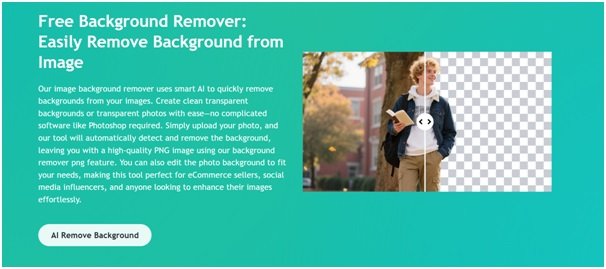
Content creators face constant pressure to maintain high visual standards. An ai background remover becomes an essential tool for maintaining consistency across posts, eliminating distracting elements that don’t fit their aesthetic, and quickly preparing multiple images for publishing. What once required outsourcing to editors can now be handled in-house within minutes.
Parents and family photographers appreciate the ability to rescue candid moments. That perfect shot of your child blowing out birthday candles—with an awkward stranger visible in the background—can be saved. The graduation photo with an unfortunate trash can behind the graduate becomes usable. These aren’t just photos; they’re memories, and AI tools help preserve them as you wish to remember them.
Discovering ezremove.ai
In the expanding marketplace of AI photo tools, ezremove.ai has established itself as a particularly accessible and effective option. The platform was designed with regular users in mind, not just professional designers. This philosophy shows in every aspect of the interface and functionality.
Accessing ezremove.ai requires no software download or installation. You work directly through your web browser, which means you can edit photos on any device—your laptop at home, your work computer, or even your phone while traveling. This flexibility proves invaluable when you need quick edits on the go.
After marking your selections, a single click initiates the AI processing. Within seconds, you see the results. The unwanted elements vanish, replaced by intelligently generated content that blends seamlessly with the surrounding area. If the first attempt doesn’t meet your expectations, you can refine your selection and process again. There’s no limit to attempts, encouraging experimentation until you achieve exactly what you envision.
Strategies for Optimal Results
While AI technology handles the technical complexity, understanding a few strategic approaches will help you maximize success. Start by evaluating your image critically. What exactly needs removal? Sometimes what seems like a major distraction is actually a small element that’s easy to eliminate. Other times, multiple objects require attention, and tackling them one at a time produces better results than trying to remove everything simultaneously.
Image quality matters significantly. High-resolution photos provide more data for the AI to work with, resulting in cleaner, more detailed reconstructions. If you’re taking photos specifically for later editing, shoot at the highest quality setting your camera offers. For existing photos, work with the original file rather than versions that have been compressed or resized for sharing.
Background complexity influences outcomes. Removing objects against uniform backgrounds—solid walls, clear skies, calm water—typically produces perfect results immediately. More textured or patterned backgrounds may require closer attention. If you’re removing something from a complex scene like a forest or crowded market, take extra care with your selection boundaries. The more accurately you define what should disappear, the better the AI can predict what should appear instead.
Consider the surrounding elements carefully. If an object casts a shadow or reflection, include those in your removal selection. If something partially hides behind the object you’re removing, think about whether the AI has enough context to reconstruct the hidden portion accurately. Sometimes removing a large object works better in stages, eliminating smaller sections and allowing the AI to fill each area before moving to the next.
Embracing the New Standard
The emergence of accessible AI editing tools marks a significant shift in photography culture. Perfection is no longer reserved for those with professional resources. Anyone can now produce polished, clean images suitable for any purpose. This democratization empowers people to share their visual stories with confidence.
These tools don’t diminish photography skills; they enhance them. A photographer’s eye for composition, timing, and lighting remains irreplaceable. AI simply removes the technical barriers that previously prevented people from presenting their vision fully realized. It’s the difference between having a great idea and being able to execute it.
As you incorporate AI object removal into your workflow, you’ll likely find your entire approach to photography evolving. You might take chances on compositions you would have skipped before, knowing you can clean them up later. You might feel more confident sharing your work publicly. Most importantly, you’ll spend less time frustrated by technical limitations and more time enjoying the creative process.
The future of personal photography is clearer, cleaner, and more accessible than ever before. With tools like AI-powered removal at your fingertips, every photo holds the potential to become exactly what you envisioned.