

A lot of visual work breaks down at the same point. The idea is clear enough, the direction is mostly there, but the last mile still takes too much time. Teams have a usable photo but need a new style. Creators have a strong reference but need variation. Marketers have one approved asset but need five more versions for different channels. In that gap between “good starting point” and “usable final image,” Image to Image becomes interesting because it treats transformation as a practical workflow rather than a single magic trick.
What makes this category valuable is not that it removes human judgment. It does not. In my observation, it reduces the cost of trying strong visual directions quickly. That matters because modern creative work often depends less on making one perfect image and more on reaching a useful image faster, comparing options, and refining the one that fits the job. A tool becomes meaningful when it helps that process feel structured instead of chaotic.
Why Visual Transformation Matters More Now
The older creative model assumed that each new visual needed a new production cycle. A new style meant another shoot, another mockup, another round of editing, or another designer pass. That model still works, but it is expensive in both time and attention.
Today, many visual tasks begin with something that already exists. It may be a product photo, a portrait, an illustration draft, or a frame from a campaign. The real task is often not creation from zero. It is controlled transformation.
Existing Assets Already Hold Most Decisions
A source image already contains major creative decisions: subject placement, framing, mood, color balance, lighting logic, and visual emphasis. That means the starting point is often stronger than a text-only prompt. Instead of rebuilding the entire scene, the user can guide the image toward a new result while preserving the parts that still work.
Speed Becomes Part Of Creative Quality
This is not only about convenience. When iteration becomes fast, better decisions become more likely. In my testing of platforms in this category, the value often comes from trying several plausible versions while the original intent is still fresh. A slower workflow can make people settle too early. A faster one gives more room for comparison.
How The Product Appears To Work Publicly
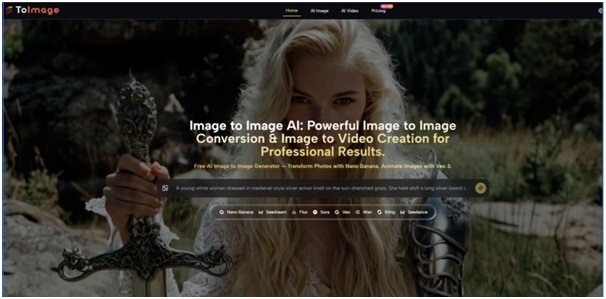
Based on the public pages, the platform is built around a simple but important sequence: start with a prompt or an uploaded image, choose a model, generate results, then compare or refine from there. The product does not present itself as one engine with one output style. It presents a model-based workspace where different generation paths are available for different goals.
One Interface, Multiple Model Paths
The public positioning is notable because it combines several model families in one place. For image work, it highlights options such as Nano Banana, Nano Banana 2, Seedream, Flux, GPT-4o, and other editing or generation models. For motion work, it also exposes video-oriented models like Veo 3, Veo 3.1, Kling, Wan, Runway, and Seedance. That matters because different tasks benefit from different strengths.
Transformation Sits Beside Generation
The platform does not frame image creation as text-only generation. It places text-to-image and image-to-image next to each other. That is a practical design choice. Some users want to invent a new scene from words, while others want to upload a real photo and redirect it. Those are different creative needs, and the interface seems designed to accommodate both.
Reference-Led Control Looks Central
One of the more useful public claims is support for reference images in certain models. In particular, Nano Banana is presented as supporting up to four reference images for style consistency and character continuity. That suggests the platform is not just for one-off experiments. It is also trying to address recurring visual work where continuity matters.
What The Workflow Looks Like In Practice
The Image to Image AI public flow is straightforward enough that most users could understand it without training. That simplicity is part of the product logic.
Step 1. Upload Or Describe A Starting Point
The first step is either entering a text idea or uploading an existing image. For image-to-image tasks, the uploaded source image is the core material. The platform then uses that input as the visual foundation for transformation.
Step 2. Describe The Change You Want
The second step is prompt-based direction. The user describes what should change: style, mood, detail level, background, composition emphasis, or the broader visual identity of the result. For video paths, the prompt can also describe motion, camera behavior, or environmental movement.
Step 3. Choose The Model That Fits The Job
The third step is model selection. This is where the product seems more serious than tools that hide everything behind one button. A user can choose a model associated with realism, speed, precision, or motion control depending on the task. In my view, this is one of the most practical parts of the platform because it encourages fit rather than guesswork.
Step 4. Generate, Compare, And Refine
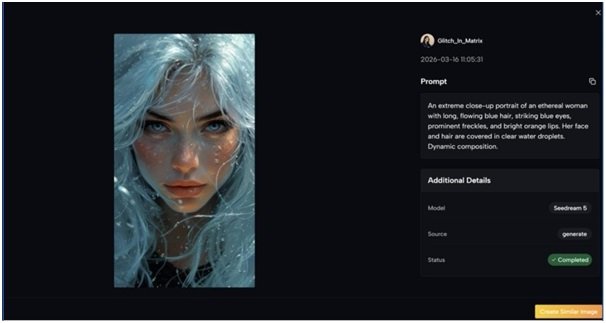
After generation, the user can compare versions, adjust the prompt, switch models, or try another pass. Publicly, the product also suggests that multiple results can be generated and stored in a cloud library. That makes the workflow feel iterative rather than final on the first attempt.
Which Model Strengths Seem Most Important
Different model choices appear to serve different types of image work. This is where the platform becomes easier to evaluate as a workflow tool rather than a marketing page.
Nano Banana For Controlled Realism
Nano Banana is presented as a strong image-to-image model for hyper-realistic transformation. The emphasis is on preserving key visual elements while changing style or improving detail. If that public framing is accurate in regular use, it would make this model well suited to product visuals, portraits, and any case where the source image still needs to remain recognizable.
Reference Images Improve Continuity
The support for multiple reference images is especially meaningful. Continuity is one of the hardest parts of AI-assisted image work. If a creator is building a recurring character, a branded aesthetic, or a consistent campaign identity, reference-led generation can matter more than raw beauty in a single image.
Nano Banana 2 For Resolution And Output Volume
Nano Banana 2 is positioned as a more advanced path with resolution control and batch generation. Publicly, it supports up to four images per request and offers higher output sizes such as 1K, 2K, and 4K. That kind of structure makes sense for teams comparing options quickly or preparing assets for different placements.
Seedream For Faster Iteration
Seedream appears to be the speed-oriented option. Not every task requires maximum nuance. Some workflows reward quick variation more than perfect detail. In those cases, a faster model can be the better business choice because the cost of exploration is lower.
Flux For Precision Editing
Flux is described in a more surgical way. It is positioned around context-aware editing, object-level control, and text handling inside images. In practical terms, that suggests a user could approach it not just as a style engine, but as a more directed editing route for specific changes.
A Simple Comparison Of Publicly Framed Strengths
| Model Path | Publicly Emphasized Strength | Best-Fit Use Case |
| Nano Banana | Hyper-realistic image transformation | Portraits, product images, strong source preservation |
| Nano Banana 2 | Higher resolution and batch output | Comparing multiple polished options quickly |
| Seedream | Fast generation speed | Rapid exploration and high-volume workflows |
| Flux | Context-aware precision editing | Specific element changes and text-sensitive edits |
| Veo 3 | Image-to-video with native audio | Cinematic motion from still images |
| Veo 3.1 | Frame control and guided transitions | More controlled motion workflows |
Where The Product Feels Most Useful
The platform looks strongest when the user already has material worth extending. That is different from fully open-ended art generation.
Marketing Teams Extending Existing Assets
A brand often has one approved photo set and needs new visual variations for ads, landing pages, and social posts. In that scenario, image-to-image is more practical than starting again from zero. The source photo already encodes the brand logic.
Creators Testing Style Without Rebuilding Composition
Illustrators, content creators, and solo founders often know which scene they want but not which style will communicate it best. A reference-led workflow can help test realism, illustration, cinematic tone, or a more stylized look without discarding the original composition.
E-Commerce And Product Presentation
The public use cases also point toward product mockups and marketing visualization. That makes sense. Product photography is expensive, and many teams need more contexts than they can afford to shoot manually. A transformation workflow is appealing because it can turn one practical image into several usable directions.
The Limits Are Worth Saying Clearly
No serious image workflow should be described as automatic perfection. This category still depends heavily on input quality, prompt clarity, and model fit.
Prompt Quality Still Shapes Outcomes
A vague instruction usually produces a vague result. In my testing of similar tools, the difference between a decent output and a strong one often comes from specifying what should stay stable and what should change.
Multiple Passes Are Often Normal
A good platform reduces friction, but it does not eliminate iteration. Users should expect to generate more than once, especially when style, consistency, or commercial polish matters.
Model Choice Can Matter As Much As Prompt Choice
Because this product surfaces multiple engines, the burden shifts slightly from “hope the tool understands me” to “choose the right path for the job.” That is a strength, but it also means better results may require a bit of judgment.
Why This Approach Feels More Practical Than Abstract
What stands out most is not a single flashy promise. It is the structure. The product appears to understand that image work is rarely one-dimensional. Some users need realism. Some need speed. Some need editing precision. Some need motion. Putting those routes in one place makes the platform easier to understand as a working environment.
In that sense, the real value is not just that images can be transformed. It is that transformation becomes organized. A user can start from something real, guide it with text, choose a model based on the job, compare results, and refine without leaving the same broader workflow. That is why this kind of tool matters. It does not replace taste or creative direction. It gives those things a faster and more flexible operating surface.