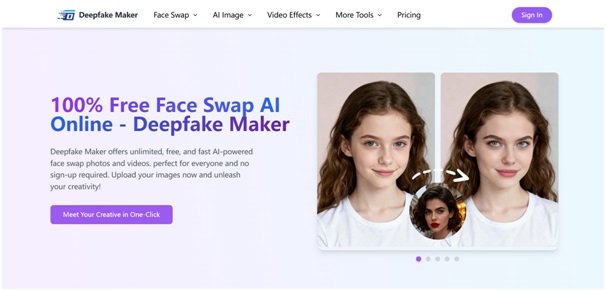



In this blog, we’ll follow a single, concrete scenario: a short-form video creator who wants to turn ordinary clips into viral content without learning complex editing tools. Along the way, you’ll see how deepfake maker io, powered by Deepfake Maker, solves real problems like editing time, budget, quality, and privacy—while keeping things fun and safe.
Table of Contents
- The Creator’s Challenge: Viral Content With No Editing Team
- What Is Deepfake Maker io?
- Step-by-Step: How Our Creator Uses Deepfake Maker for a Viral Series
- Problems deepfake maker io Solves in This Scenario
- Essential Features of deepfake maker io for Creators
- Staying Safe & Ethical With Deepfake Maker
- Pro Tips to Get More From Deepfake Maker
- Conclusion
The Creator’s Challenge: Viral Content With No Editing Team
Meet Alex, a TikTok and Instagram Reels creator. Alex has tons of funny ideas: parody skits, reaction memes, “what if my friend were in this movie” edits, and more. The problem?
- No video editor on the team
- Limited budget for paid software
- Zero time to learn complex tools
- Needs no watermark, no signup friction, and fast results that fit a busy posting schedule
Alex tried traditional editing apps, but face swap features were either too confusing, too slow, or locked behind paywalls. That’s where deepfake maker io comes in: an online AI face swap platform from Deepfake Maker that turns these ideas into real, shareable content in a few clicks.

What Is Deepfake Maker io?
Deepfake maker io is the web experience of Deepfake Maker, a 100% online AI face swap tool. You open the site, upload your media, and let the AI do the work—no software installation, no complicated timeline editing.
From the homepage, Deepfake Maker focuses on:
- Free face swap AI for photos and videos
- Fast generation in just a few seconds
- No login required and no watermark on outputs
- Support for photos, videos, and GIFs in common formats like JPG, PNG, WEBP, and more
For Alex, deepfake maker io feels more like a smart camera filter than a traditional editor. It removes the “technical barrier” and lets creativity come first.
Step-by-Step: How Our Creator Uses Deepfake Maker for a Viral Series
Let’s walk through one concrete use case: Alex wants to launch a recurring series called “My Friends in Famous Scenes”—short clips where the faces of friends are swapped into iconic movie shots or viral videos.
Step 1 – Collect Source Clips and Face Photos
First, Alex gathers:
- Short video clips or GIFs from royalty-free libraries or self-recorded scenes
- Clear photos of friends’ faces (with their consent)
- A few funny selfies to test different expressions
Everything is stored in a simple folder, ready to upload into deepfake maker io.
Step 2 – Use Deepfake Maker’s Face Swap Tools
On deepfake maker io, Alex selects the right tool for each idea:
- Photo Face Swap for meme images and thumbnails
- Video Face Swap for TikTok-ready clips
- GIF Face Swap for looping reaction memes
The actual workflow is usually just:
- Upload the original clip or image
- Upload the face to swap in
- Click to generate and wait a few seconds for the AI to process
Because Deepfake Maker is optimized for speed, Alex can test multiple ideas quickly, keeping the creative flow going.
Step 3 – Download, Caption, and Publish
Once the AI finishes, Alex downloads the result with no watermark and moves to the social apps:
- Adds captions and hashtags
- Schedules posts across TikTok, Instagram Reels, and YouTube Shorts
- Tracks which style of deepfake face swap performs best
Within a few days, one of the “My Friends in Famous Scenes” clips goes viral. The series becomes a regular format on Alex’s channel—all powered by deepfake maker io in the background.
Problems deepfake maker io Solves in This Scenario
For Alex and many other creators, deepfake maker io isn’t just a cool toy—it directly solves real content-creation problems.
Lack of Editing Skills
Most creators aren’t professional editors. Deepfake Maker hides the complexity behind a simple 3-step workflow: upload, generate, download.
No Budget for Expensive Software
High-end deepfake tools and pro editing software can be expensive. deepfake maker io offers free usage with no login and no watermark, making it accessible for students, beginners, and indie creators.
Time Pressure and Posting Consistency
Algorithms love consistent posting. Because Deepfake Maker processes images and videos in seconds, Alex can batch-create multiple edits in a single session, keeping the content calendar full without sacrificing sleep.
Privacy and Data Concerns
Creators worry about where their files go. Deepfake Maker emphasizes privacy-safe processing and not storing user uploads, which is crucial when you’re working with friends’ faces or personal footage.
Essential Features of deepfake maker io for Creators
The power of deepfake maker io comes from the variety of tools offered by Deepfake Maker. Here are some highlights that matter in our scenario.
Photo Face Swap
Perfect for:
- Thumbnails
- Static memes
- Before/after transformations
You upload an original image and a target face, and Deepfake Maker blends them into a realistic photo in seconds. This is how Alex creates eye-catching covers for each episode of the viral series.
Video Face Swap
This is the star of the show. With Video Face Swap, deepfake maker io lets Alex:
- Upload a short video or clip
- Apply a new face while preserving expressions and motion
- Export a realistic deepfake video that feels native to TikTok or Reels
It’s ideal for skits, parodies, and reimagined scenes.
GIF Face Swap
GIFs are still huge on social media and messaging apps. Deepfake Maker’s GIF Face Swap tool lets Alex turn reaction GIFs into personalized content with friends’ faces—perfect for sharing in group chats or posting as replies.
Multiple Face Swap
When Alex wants to edit group photos or “everyone becomes the same character” type memes, the Multiple Face Swap feature handles it automatically. Deepfake Maker can swap several faces in one shot, saving a ton of manual work.
Extra AI Image and Video Tools
Beyond core face swap features, deepfake maker io connects you to many related AI tools:
- AI gender swap for playful “what if” transformations
- Nano Banana AI and other image generators for creative backgrounds
- Various AI video generators for dancing, lip-sync, or special effects
All of these expand what Alex can do within the same ecosystem, without juggling multiple platforms.
Staying Safe & Ethical With Deepfake Maker
Deepfake technology is powerful, and Deepfake Maker encourages responsible use. Even in our fun scenario, Alex follows a few simple rules when using deepfake maker io:
Always Get Consent
- Friends agree to have their faces used, especially if the content will be public.
Avoid Impersonation and Harm
- No pretending to be celebrities or public figures in ways that mislead or damage reputations.
Respect Platform Policies and Local Laws
- Alex makes sure TikTok, Instagram, and local regulations allow AI-edited content of this type.
Label Content When Needed
- If a clip looks extremely realistic, adding a note like “AI face swap using Deepfake Maker” helps viewers understand it’s an edit, not reality.
By combining creativity with responsibility, deepfake maker io becomes a fun and safe tool instead of a risky one.
Pro Tips to Get More From Deepfake Maker
If you’re planning to use deepfake maker io like Alex, here are a few tips:
Use High-Quality Source Photos
- Clear, front-facing faces with good lighting give the AI more detail to work with.
Match Expressions and Angles
- When the expression and head angle in the source and target images are similar, Deepfake Maker can produce more realistic results.
Batch Your Ideas
- Spend one session brainstorming scripts and collecting clips, another session doing face swaps on deepfake maker io, and a third session editing captions and scheduling posts.
Test Different Formats
- Try Photo Face Swap for thumbnails, GIF Face Swap for reactions, and Video Face Swap for your main posts. See which format your audience likes best.
Reuse Successful Templates
- Once a certain style of deepfake video works, turn it into a series. Consistency helps build recognition and follower loyalty.
Conclusion
Alex’s story is just one example of what’s possible with deepfake maker io. With free, fast, and watermark-free AI tools from Deepfake Maker, you can:
- Turn simple ideas into scroll-stopping content
- Create memes, reaction clips, and parody scenes in minutes
- Maintain your posting schedule without burning out
- Experiment with new formats like GIFs, Multiple Face Swaps, and AI-generated images
If you’re a content creator, marketer, student, or just someone who loves experimenting with AI visuals, deepfake maker io gives you a powerful but accessible toolkit in your browser. Open Deepfake Maker, upload your ideas, and see how quickly your next viral post can come to life.