

There’s something uniquely frustrating about discovering that your photos are terrible only after the moment has passed. Whether it’s a birthday celebration where every shot came out blurry, a vacation album filled with dark and grainy images, or precious old photographs that have degraded over time, bad photos feel like lost opportunities. The memories are still there, locked inside flawed images that seem beyond repair. Fortunately, modern artificial intelligence has transformed photo rescue from an impossible dream into an instant reality, capable of fixing even catastrophically bad images faster than you can imagine.
Why Speed Matters in Photo Repair
When photo fixing required hours of manual work, most people never bothered attempting it. Those bad photos stayed bad, eventually getting deleted or forgotten in the depths of storage drives. The emergence of rapid AI processing fundamentally changes this equation. When you can fix a photo in five seconds instead of five hours, suddenly rescuing those images becomes a realistic option rather than a theoretical possibility.
Speed also enables experimentation. In traditional editing, you’d carefully plan each adjustment because mistakes cost time. With AI, you can try different approaches instantly, comparing results and finding the optimal fix without any significant time investment. This freedom to experiment often leads to better outcomes because you’re not locked into your first attempt.
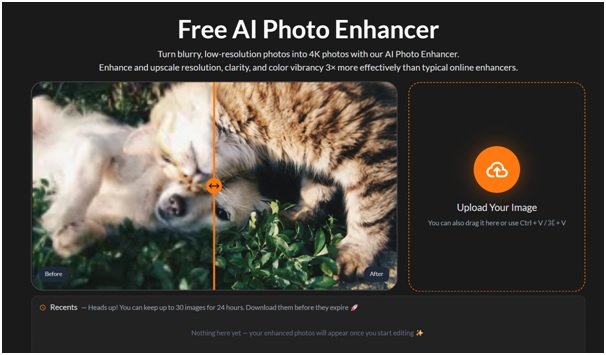
Perhaps most importantly, fast processing means you’ll actually use these tools. A Free AI Photo Enhancer that delivers instant results fits seamlessly into your daily routine. You can fix photos while waiting for coffee, during a commute, or in any spare moment. This convenience transforms photo repair from a major project into a simple task you can complete whenever inspiration strikes.
The Technology Behind Instant Fixes
Modern AI photo repair relies on neural networks trained on millions of images. These systems have learned what high-quality photographs look like across countless scenarios—portraits, landscapes, indoor shots, outdoor scenes, day and night. When you upload a bad photo, the AI compares it against this vast knowledge base, identifying specific problems and understanding what your image should look like if it were captured properly.
This comparison happens at incredible speed because the AI isn’t making decisions from scratch for each photo. Instead, it applies patterns learned during training, rapidly identifying issues and applying appropriate corrections. An Unblur Image function doesn’t just guess at sharpening—it understands the mathematical relationships between blurred and sharp images, applying precise inverse transformations that restore lost detail.
The processing happens in stages, though these stages blur together in the seconds it takes to get results. First comes analysis: the AI identifies problems, recognizes important elements like faces, and understands image structure. Next comes correction: targeted adjustments address specific issues while preserving important characteristics. Finally comes optimization: the AI ensures corrections haven’t introduced new problems and that the enhanced image looks natural rather than over-processed.
Step-by-Step Instant Repair
Starting your photo rescue couldn’t be more straightforward. Open your photo library and identify images that need help. You probably already know which ones these are—they’re the photos you never share, the ones that disappoint you every time you see them. Don’t overthink the selection process; if a photo bothers you, it’s a candidate for fixing.
Navigate to an AI photo enhancement platform through your web browser. No downloads, installations, or account creation necessary—just direct access to powerful repair tools. Upload your troubled image using whatever method feels most convenient: drag-and-drop from your file browser, paste from clipboard, or traditional file selection.
The moment your image uploads, processing begins automatically. You’ll see a brief indicator—often just a few seconds—while the AI analyzes and repairs your photo. Then, almost instantly, your result appears. The transformation from bad to good happens so quickly that it can feel surreal, like watching a time-lapse of professional editing compressed into mere seconds.
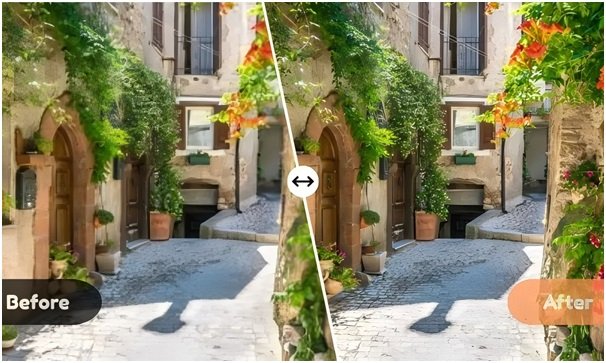
Examine your repaired photo carefully by comparing it to the original. Most platforms show both versions side-by-side, making differences immediately obvious. Look for the specific problems that bothered you—has blur been eliminated? Are dark areas now visible? Do colors look natural? This quick review ensures the repair meets your needs before you download and save.
Real-World Rescue Scenarios
Consider a common situation: you attended a friend’s wedding and took dozens of photos, but realized later that most came out poorly. Indoor lighting created orange color casts, dancing guests are blurry, and group shots in dim corners are far too dark. Traditional editing would mean hours of work, so you never bothered. With AI, you can fix the entire collection in one sitting. Upload each photo, apply appropriate enhancement, and download improved versions. Within an hour, you’ve transformed a disappointing album into shareable memories.
Or imagine discovering a box of old family photographs from decades ago. Scanning them reveals fading, scratches, and general deterioration. These precious memories look terrible, and scanning companies charge significant fees for restoration. AI restoration lets you scan these photos yourself, then repair them instantly for free. Images that seemed permanently damaged become clear and vibrant again, ready to share with family or preserve for future generations.
Product sellers face photo quality challenges constantly. Smartphone cameras in less-than-ideal conditions produce images that don’t do products justice. Potential buyers scroll past listings with poor-quality photos. AI enhancement transforms these mediocre product shots into professional-looking images that attract attention and drive sales—all within minutes of taking the original photos.
Conclusion
Successfully rescuing bad photos changes your relationship with photography. You become less stressed about capturing perfect images because you know imperfect ones can be fixed. This confidence lets you take more experimental shots, try challenging conditions, and focus on capturing moments rather than obsessing over technical perfection.
Your photo archive transforms from a mixture of good and terrible images into a collection where even previously bad photos become usable and shareable. Those images you were embarrassed to show now become conversation starters—”This photo looked terrible originally, but AI fixed it completely.” The technology itself becomes part of the story.
Perhaps most valuably, memories previously lost behind terrible image quality become accessible again. That blurry photo of your grandmother is now clear enough to frame. The dark shots from your first child’s birthday party are now bright and shareable. Images you’d written off as failures gain second lives, and with them, the memories they contain become vivid once more.
The speed of AI photo repair means this transformation happens not over weeks or months, but instantly. Your worst photos can be rescued right now, in the time it takes to read this article. The tools are free, the process is simple, and the results are often stunning. All that remains is to try it yourself and witness the instant resurrection of images you thought were beyond saving.